RP2040-Zero Development Board
Overview
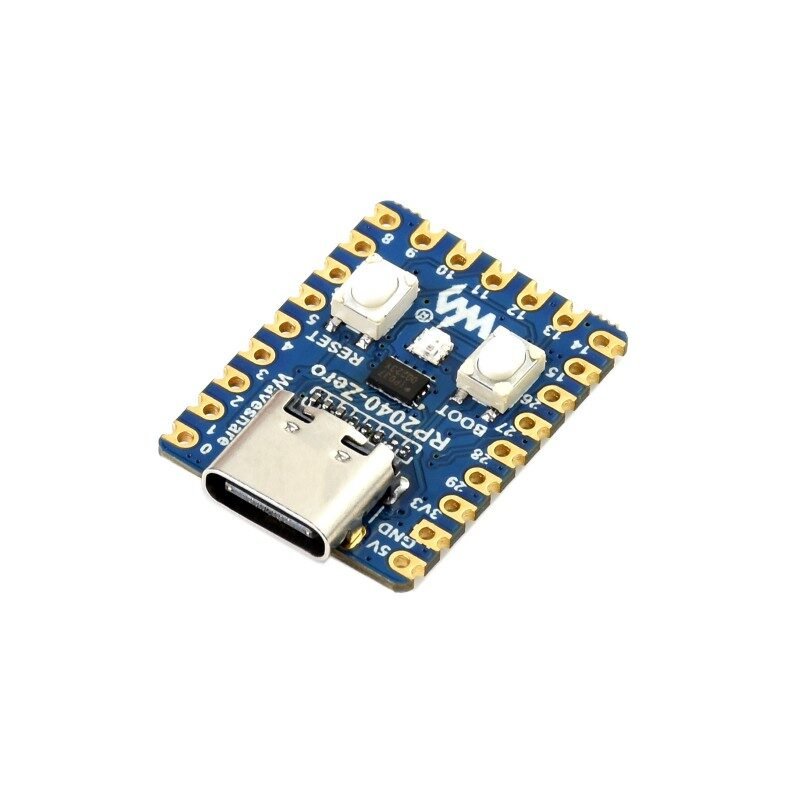
A tiny (23.5×18mm) castellated-edge dev board built around the Raspberry Pi RP2040 chip — the same silicon family as the Raspberry Pi Pico 2 W already in this library, but RP2040 (not RP2350) and without WiFi/Bluetooth radios. Pico-like pinout in a much smaller footprint, USB-C instead of micro-USB, and an onboard WS2812 addressable RGB LED for status indication without needing an external one.
Key specs
- MCU: RP2040, dual-core Arm Cortex-M0+, up to 133MHz
- Flash: 2MB NOR flash
- GPIO: 29 total — 20 via edge castellated pins (23-pin main header + two 5-pin side headers), remainder via solder points
- Interfaces: 2× SPI, 2× I2C, 2× UART, 4× 12-bit ADC, 16× PWM channels
- USB: USB-C (data + power)
- Onboard: BOOT button, RESET button, WS2812 RGB LED (data line on GPIO16), ME6217C33M5G 3.3V LDO regulator (800mA max)
- Power: USB-C, or +5V into the VSYS pin; onboard regulator supplies 3.3V to the RP2040
Pinout
Main 23-pin edge header: GPIO0–GPIO15, GPIO26–GPIO29, 3V3, GND, VSYS. Two secondary 5-pin headers: GPIO17–GPIO21, and GPIO22–GPIO25 + GND.
| Special function | GPIO |
|---|---|
| Onboard WS2812 RGB LED (data) | 16 |
| BOOT button | Hardware BOOTSEL, not a GPIO (same as Pico) |
| ADC-capable | GPIO26–29 |
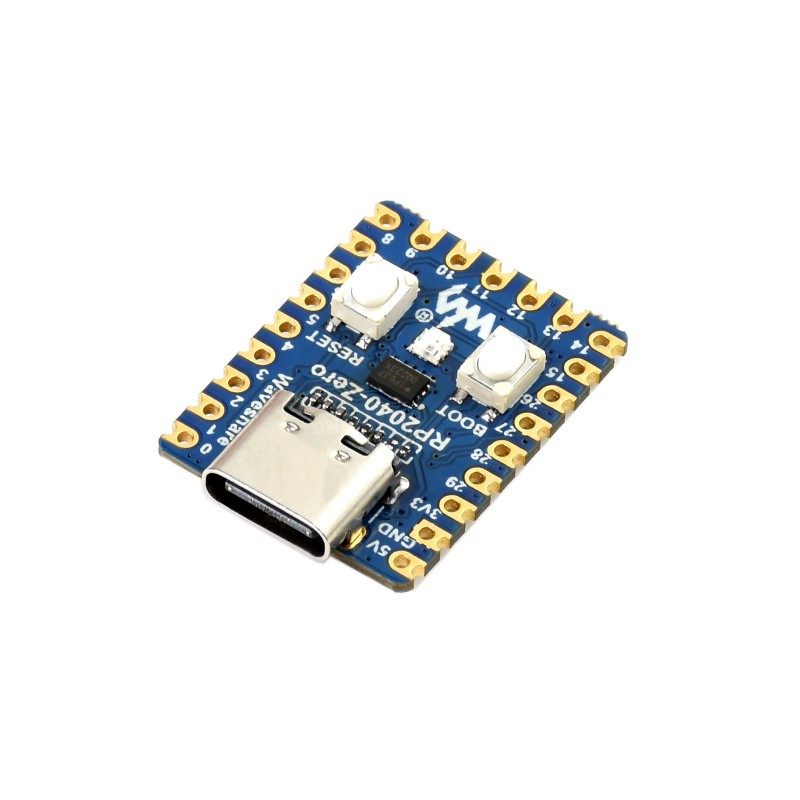
Exact per-edge pin ordering matches the standard Waveshare RP2040-Zero silkscreen (visible directly on the board itself) — refer to the physical unit’s own printed labels when wiring, since this is a castellated-edge board without a full pin breakout table needed beyond what’s silkscreened.
Wiring / typical usage
Power and program over USB-C — hold BOOT while plugging in (or while pressing RESET) to enter USB mass-storage bootloader mode for drag-and-drop UF2 firmware, identical workflow to the Pico/Pico 2 W. The onboard WS2812 LED needs a single-wire addressable-LED driver (e.g. Adafruit NeoPixel library) on GPIO16, not a simple digitalWrite.
Code / libraries
- Arduino: install the “Raspberry Pi Pico/RP2040” board package (earlephilhower or official Arduino-Pico core), select a generic RP2040 board or “Waveshare RP2040-Zero” if listed.
- MicroPython/CircuitPython: standard RP2040 UF2 builds work; CircuitPython has a dedicated
waveshare_rp2040_zeroboard definition. - WS2812 LED:
Adafruit_NeoPixel(Arduino) orneopixel/rp2040.PIObased drivers (MicroPython/CircuitPython), addressed on GPIO16.
Source material
- Bag label (item name, RP2040/Raspberry Pi microcontroller identity) read directly from supplied photo.
- Full specs, pinout groups, onboard component list: Waveshare RP2040-Zero product page, Waveshare RP2040-Zero wiki
- Product photo:
/inventory/rp2040-zero/product-photo.jpg— representative, genuine Waveshare-branded unit (our unit is a reseller-branded copy of the same open reference design, silkscreen and layout should match but branding does not), sourced 2026-07-25 from https://www.waveshare.com/media/catalog/product/cache/1/image/800x800/9df78eab33525d08d6e5fb8d27136e95/r/p/rp2040-zero-1.jpg - Local files: see
/inventory/rp2040-zero/as-supplied.jpeg(sealed bag with item label, as owned)
Verification
Bag label read directly from photo — confirms this is an RP2040-based Pi-microcontroller dev board matching the "RP2040-Zero" name, high confidence. Full spec table Sourced from Waveshare's official product page and wiki for the reference design this board is built from — not independently confirmed against this specific reseller-branded unit's own silkscreen/schematic, since the board hasn't been unbagged/photographed in detail yet. Treat pin-for-pin layout as high-confidence but verify against the physical board's own silkscreen before wiring, in case the reseller's copy deviates.
Notes / gotchas
- Manufacturer field on the bag (EUVAN BUSINESS SRL) is almost certainly a reseller/private-label, not the actual silicon or PCB fab — treat this as “RP2040-Zero reference design,” not confirmed genuine Waveshare stock.
- No WiFi/Bluetooth on this chip (RP2040) — if a project needs wireless, use the Heltec V4, ESP32-C3 SuperMini, or T-Display instead.
- BOOTSEL-style firmware flashing (drag-and-drop UF2) is the same as the Pico family — no separate USB-UART chip needed, unlike the ESP32-based boards in this library.